The ECO Flow (Alpha)#
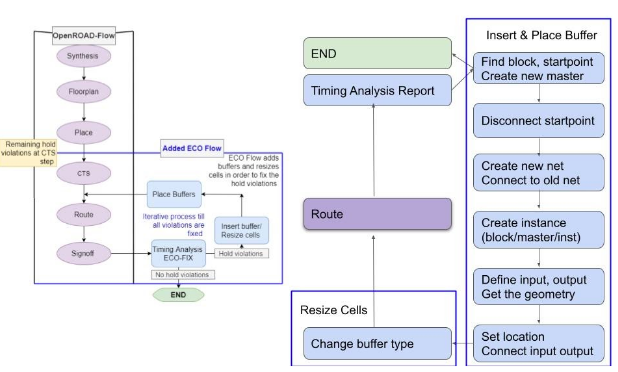
The ECO flow starts from checking the report generated in the route step. A python script is used to check the report, insert buffers, and do the resize. Inside the ECO loop, the python script, cts and route step are called sequentially. The reports are generated each time, and the loop stops until no hold time violations are found. See overview diagram below:
Flow to Insert Buffer#
Run the OL flow
Hold violations will be present in the log files
Run gen_insert_buffer.py, using regex to get the
pinnameGenerate the command
insert_buffer {pin_name master_name net_name inst_name}Generate the command
size_cell {inst_name new_master_name}to adjust the path delay. (sky130_fd_sc_hd__dlygate4sd3_1is the master with the longest delay, larger number at the end means shorter delay)Rerun the STA and route step
Repeat 1-6 till all hold violations are solved. Given a routing report, we first parse the reports into several sections. Each section contains one path. Then, regular expressions are used to detect if the path is
VIOLATED. If the path has hold time violations, we save the slack and corresponding startpoint into a vector. The type of the buffer issky130_fd_sc_hd__dlygate4sd3_1, so the number of the buffer to be inserted should be the minimum slack divided by FO1 delay. Finally, we dump all theinsert_buffercommands into a tcl file.
Insert Buffer Command#
Find the violation’s startpoint
Create the buffer and nets
Disconnect the original nets (slightly different for reg-to-reg and pin-to-reg cases)
Place the buffer
Connect new nets (slightly different for reg-to-reg and pin-to-reg cases) We realize all the operations with OpenDB commands. When we insert the buffer, we move the old net together with the startpoint, - the net name should be the same with the pin name and cannot be changed. In OpenDB.
connectanddisconnectfunctions areclass staticforregcases and regular member methods for pin cases. Forregcases, we also need to specify which port (input or output) to disconnect the line from.
Testcase Results#
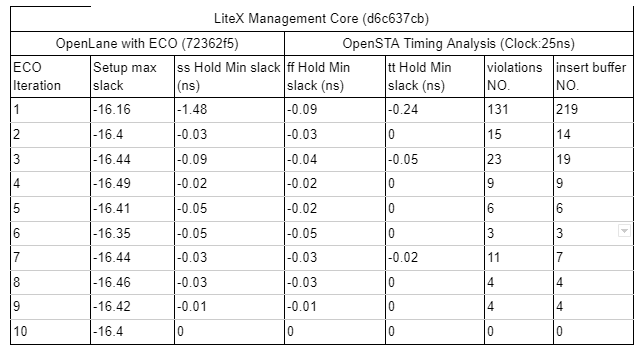
We tested the latest OpenLane with ECO on the LiteX Management Core rc-8 release. All the timing reports are generated by OpenSTA.
For the 1st iteration, the design has 131 hold violations with a -1.48 worst case slack. Our ECO inserts 219 buffers into the block, which greatly reduces the number of violations. After 10 iterations, all the violations are solved and setup time is not influenced during this process. The following table shows the timing results of the ECO flow for each ECO iteration:
How to enable the ECO flow#
If the user would like to enable this step, they would have to set the ECO_ENABLE environment variable to 1 as follows:
set ::env(ECO_ENABLE) {1}
Or they can invoke OpenLane with the option -override_env ECO_ENABLE=1.